MCP has a wonderfully simple sales pitch: stop hand-rolling a new connector every time an AI app needs to read a repo, query a database, inspect a ticket, or call an internal tool.
That is genuinely useful. It is also exactly where engineers should sit up a little straighter.
The Model Context Protocol is often described as a standard way to connect AI assistants to data sources and tools. Anthropic’s original announcement framed MCP as a way to replace fragmented integrations with a common protocol, and its later Linux Foundation donation post pointed to broad adoption across AI products, public servers, cloud providers, registries, and SDKs.
That kind of adoption changes the question. It is no longer, “Can this agent reach the thing?” It is:
What boundary did we just create, and what are we allowing to cross it?
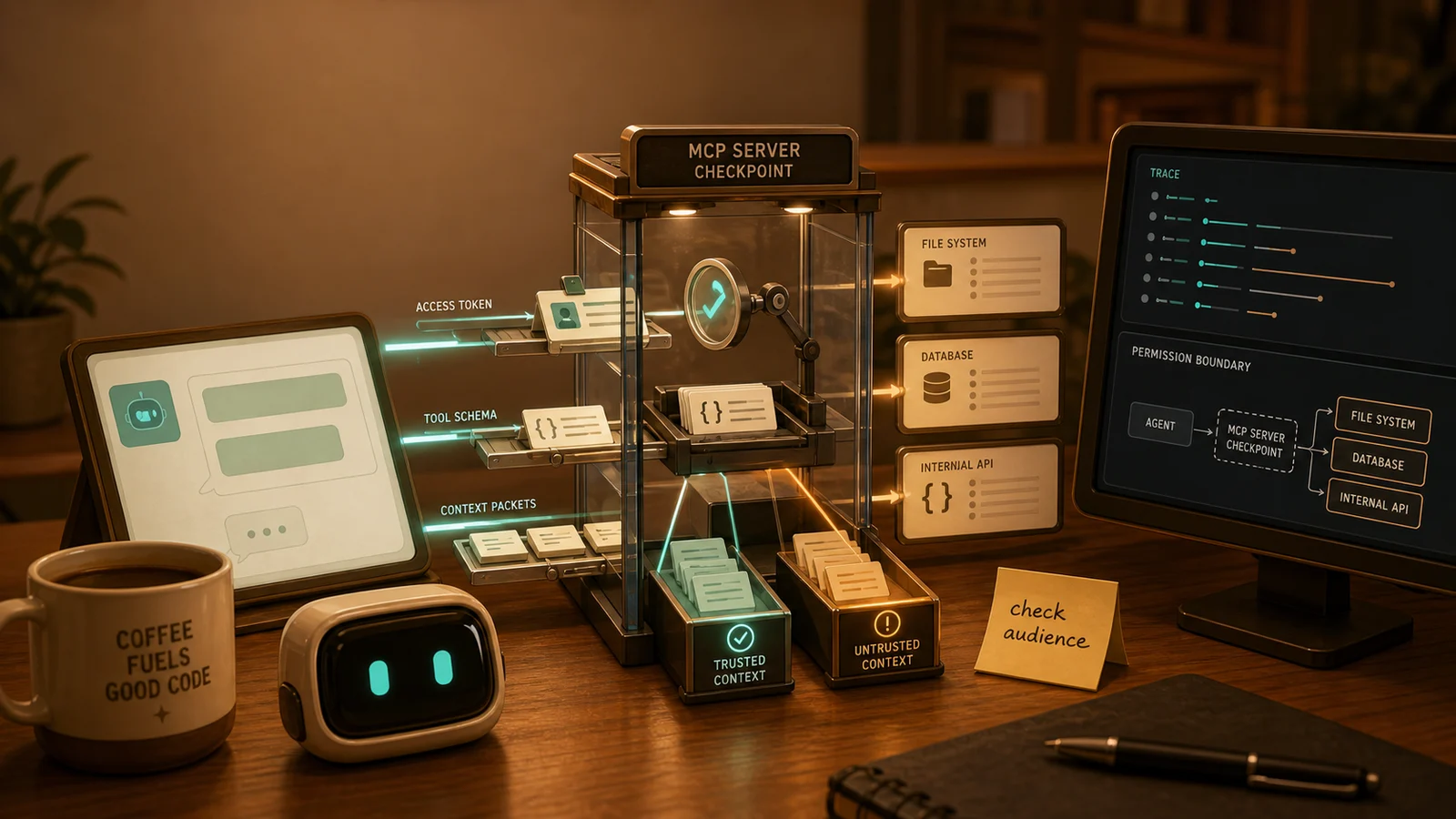
If you treat an MCP server like a harmless plugin, you will review it like decoration. If you treat it like a trust boundary, you will ask better questions before the agent gets a backstage badge and starts pressing buttons.
The Connector Trap
The easy mental model is that MCP servers are adapters. A client discovers tools, the model picks one, the server executes a request, and useful context comes back. Nice and tidy. Very demo-friendly. You can almost hear the happy little integration chime.
But the security boundary is hiding inside that convenience.
An MCP server is not just passing bytes around. It may expose tool names, descriptions, schemas, resources, prompts, and outputs that are consumed by a model. It may accept tokens. It may connect to privileged upstream systems. It may return content that gets placed next to user instructions, system instructions, or later tool calls.
That means several things are crossing the boundary at once:
- Identity: which server is this, and who is allowed to call it?
- Authority: what can this token or session actually do?
- Context: what data enters the model’s working set?
- Intent: what does the user think they approved?
- Side effects: what can happen in the real system?
- Evidence: what will you know after something goes sideways?
That is not “just a connector.” That is an integration boundary wearing a cardigan.
The Boundary Starts With Tokens
The MCP authorization spec treats a protected MCP server as an OAuth 2.1 resource server. That phrasing matters. It means the server is not a passive pipe; it is a resource boundary that must validate whether a caller has the right token for the right audience.
The current spec says MCP servers must validate access tokens before processing requests, ensure tokens were issued specifically for that server, and reject tokens that are not intended for them. It also says an MCP server must not pass through the token it received from an MCP client.
That last part is worth lingering on. Token passthrough is the kind of shortcut that feels convenient until it turns into an incident writeup with too many screenshots. If a server accepts a broad token and forwards it downstream, you have blurred who is acting, what resource the token was meant for, and which system actually made the authorization decision.
The official MCP security guidance warns about broad upfront scopes for the same reason. A token with everything baked in expands blast radius, makes revocation clumsy, creates noisy audits, and lets an attacker chain straight into higher-risk tools if the token leaks or the workflow is hijacked.
A healthier shape is progressive least privilege:
- Start with low-risk discovery and read-only capability.
- Ask for targeted elevation when a privileged action is first attempted.
- Keep scopes narrow enough that the audit trail still says something useful.
- Accept down-scoped tokens instead of treating “less power” as an error.
That sounds basic because it is. The catch is that MCP makes it tempting to skip the basics in the name of smoother agent workflows. Smooth is lovely. Smooth plus overbroad authority is how your integration becomes a tiny velvet rope leading directly into production.
Tool Metadata Is Model Input
In a normal API, a method description is documentation. In an agent workflow, a tool description can become part of the model’s decision-making environment.
That changes its risk profile.
Microsoft’s guidance on indirect prompt injection in MCP describes tool poisoning as malicious instructions embedded in MCP tool metadata, such as names and descriptions. The user may never see those instructions, but the model can consume them while deciding which tool to call and how to behave. Microsoft also calls out a “rug pull” pattern where a hosted tool’s definition changes after a user has already approved it.
This is the uncomfortable bit: metadata is not inert when an LLM reads it.
You would not accept random JavaScript from a dependency because the package name looked friendly. You should not accept model-visible tool metadata as harmless prose just because it appears in a schema. Tool names, descriptions, parameter descriptions, examples, and returned content all deserve review.
For engineers, the useful habit is to split tool review into two passes:
First, review it like an API:
- Does the tool do one clear thing?
- Are inputs typed and constrained?
- Are outputs predictable enough to inspect?
- Are dangerous actions separated from read-only actions?
Then review it like prompt material:
- Could the description steer the model outside the user’s intent?
- Does any metadata include instructions that belong in policy or system prompts?
- Could a later metadata change alter behavior without a fresh approval?
- Would the user understand what capability they are granting?
The second pass is the new muscle. The tool schema is part contract, part UX, part prompt surface. Treating it as only one of those is where the coffee starts tasting like regret.
Context Needs A Customs Desk
Prompt injection is not only a user typing “ignore previous instructions.” The more useful your agent becomes, the more likely it is to read external content: issues, tickets, emails, docs, pages, logs, comments, diffs, and database records.
That content can contain instructions too.
Microsoft defines indirect prompt injection as malicious instructions embedded in external content, such as documents, web pages, or emails, that the AI system processes as context. Invariant Labs’ GitHub MCP writeup gives a concrete flavor of the problem: public, attacker-controlled issue content can travel through an approved integration and influence an agent that also has access to private repository data.
The general lesson is not “never let agents read GitHub issues.” That would make for a very secure and very useless afternoon.
The lesson is that context has origin.
Public issue text, internal code, user instructions, system policy, tool metadata, retrieved docs, and tool outputs should not collapse into one big soup called “the prompt.” Once everything becomes equally trusted text, the model has to solve a security problem you failed to model.
Give context a customs desk:
- Mark untrusted external content before the model sees it.
- Keep instructions separate from data whenever possible.
- Put delimiters or data markers around retrieved content.
- Inspect tool outputs before passing them into privileged downstream actions.
- Do not let a low-trust source directly trigger a high-impact tool call without a deterministic check.
Prompt shields, classifiers, spotlighting, and similar techniques can help. But they are a layer, not the constitution. You still need permissions, segmentation, logging, review, and boring old software controls. Security fundamentals did not retire because the JSON got fancy.
Trust Zones Beat One Giant Tool Box
The NSA’s May 2026 MCP security guidance is careful and direct: MCP systems introduce risks around dynamic tool invocation, implicit trust relationships, and context sharing. It recommends treating components as different trust zones, aligning tools and models with data classification, applying strict resource and permission boundaries, inspecting outputs, and logging enough to detect abnormal paths.
That maps nicely to an engineering review question:
Which tools should never share the same room?
A weather lookup tool, an internal HR records tool, and a deployment rollback tool do not belong in one undifferentiated capability pile. Even if the agent can technically call all three, your architecture does not have to make them equally reachable under the same session, token, policy, or approval flow.
Useful segmentation can be simple:
- Public data tools: low-risk reads with minimal approval.
- Internal read tools: scoped to the user’s role and logged.
- Sensitive read tools: explicit purpose, narrower session, stronger audit.
- Write tools: separated from reads and guarded by confirmation or policy.
- High-impact tools: deterministic prechecks, approval, rate limits, rollback plans.
The point is not to smother every workflow in modal dialogs. The point is to keep a compromised context from strolling from “summarize this ticket” to “export these records” to “post the result in public” because all the tools were available and the agent found a path.
Agent workflows are good at chaining. Security design has to assume they will.
A Practical MCP Review Checklist
Before adding an MCP server to an agent, IDE, internal assistant, or product workflow, run a short design review. Not a three-week ceremony. Just enough friction to notice where authority and context cross.
1. Identity
- Do clients know which server they are talking to?
- Does the server validate tokens for its own audience?
- Are tokens rejected when expired, malformed, or intended for another resource?
- Is token passthrough avoided?
2. Capability
- What tools are exposed by default?
- Which tools are read-only, write-capable, or high-impact?
- Are scopes narrow and progressively elevated?
- Can a user or admin see what changed when tool metadata changes?
3. Context
- Which inputs are trusted instructions?
- Which inputs are untrusted external data?
- Is retrieved content marked, delimited, or otherwise separated?
- Can low-trust content influence high-trust actions?
4. Output
- What consumes the server’s response next?
- Could the output contain hidden instructions, malicious links, unsafe code, or misleading metadata?
- Are outputs inspected before entering another agent, tool, or privileged operation?
5. Evidence
- Are tool calls logged with enough context to reconstruct intent?
- Are denied calls and elevation prompts recorded?
- Can you detect unusual tool chains, repeated failures, or surprising cross-zone movement?
- Does the team know who owns patching, revocation, and incident response for this server?
That checklist is not glamorous. Neither is chmod, until the day it saves you.
The Last Sip
MCP is useful because it gives agents a cleaner path into real systems. That is also why it deserves architectural respect.
The right mental model is not “MCP server equals plugin.” It is “MCP server equals boundary.”
At that boundary, tokens carry authority, tool metadata shapes model behavior, external content can smuggle instructions, outputs can become someone else’s input, and logs are the difference between debugging and staring into the espresso void.
Build MCP integrations like small, composable pieces of infrastructure. Give them identity, least privilege, context handling, output inspection, and audit trails. Then let the agent do useful work inside boundaries you actually meant to create.
Sources On The Counter
- Anthropic’s original MCP announcement explains the protocol’s connector model and why standardizing context access became useful.
- Anthropic’s Linux Foundation donation post gives current adoption context and should be treated as vendor-reported background.
- The MCP authorization specification is the source for token validation, resource-server behavior, audience binding, and token passthrough guidance.
- MCP security best practices goes deeper on confused-deputy risks, broad scopes, and progressive least privilege.
- NSA’s May 2026 MCP security guidance is a practical read on trust zones, implementation discipline, output inspection, and operational monitoring.
- Microsoft’s MCP prompt-injection guidance explains indirect prompt injection, tool poisoning, data marking, and supply-chain controls.
- Invariant Labs’ GitHub MCP writeup is a concrete example of public context influencing a privileged MCP-connected workflow.
- The 2026 MCP threat-modeling paper supports the article’s concern that tool metadata and decision-path visibility deserve layered defenses.
- OWASP’s MCP Top 10 is useful supporting context for MCP-specific risk categories.